⇐ Blog
Polishing up Telepipe
The app is taking shape as its release approaches.
February 13, 2026
Those who follow me on Mastodon know that I have continued to work on Telepipe, my in-development command-line shell for Linux. For better indexing—and for those who have missed my more timely updates—this is a summary of the major changes that have been made since my last status report.
First, as usual: bugfixes and small tweaks.
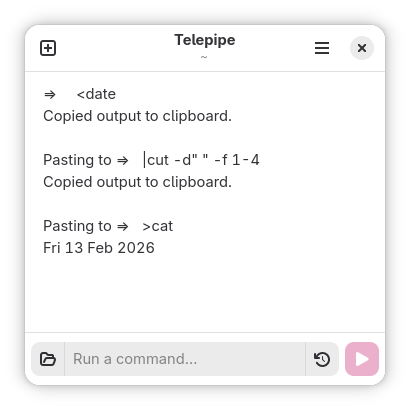
I discovered just a few days ago an odd bug in Telepipe’s clipboard redirection; If a command exited too quickly after pasting the clipboard into that command’s output, the command entry would remain unresponsive after exiting, rendering the tab useless. That has been fixed.
Another annoying bug was with the display of directory names in the window’s title bar. Telepipe is built with Flatpak, which provides the app with a secure sandbox. Previously, when changing the active directory to one that isn’t exposed by the Flatpak sandbox, the displayed directory would show the path as mounted by the app’s sandbox. This is disorienting and even incorrect for Telepipe, as it actually runs commands on the user’s host system instead of inside the Flatpak environment. That bug has been fixed as well, and as a result the filesystem permissions for the Flatpak have been substantially reduced.
Environment Variables
For use of certain command-line programs, the ability to set persistent environment variables is a necessity. Previously, it was only possible to set variables using prefixes or by simply inheriting them from your profile or RC files. This isn’t really a sufficient solution however because Telepipe’s unusual user experience demands different variables than what you might have set for your system as a whole.
So, I added support for environment variables set specifically from Telepipe.
For those who can’t watch the video: This video shows me setting the COLUMNS variable through Telepipe’s preferences dialog, then overriding it through a built-in command.
Environment variables can be set either for the current tab through the setenv command, or for the app as a whole through the preferences dialog. Environment variables from the system will be overridden by those set globally for Telepipe, and both will be overridden by any variable set specifically within the tab.
You’ll notice that the syntax for setting variables through the command-line is different from what you might use in a shell running in the terminal. This is chosen intentionally in order to prevent overlap with the underlying shell, and to better fit how Telepipe handles built-in commands and make parsing commands much easier.
One specific environment variable has a special meaning in Telepipe: SHELL. Ordinarily, this variable refers to the current shell. Telepipe will use this variable to determine the shell in which command-lines should be run. For instance, this can be used to run commands in Plan 9’s rc shell.
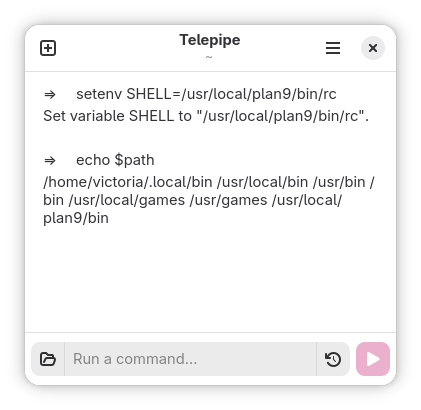
Telepipe running the Plan 9’s rc shell. Note that the parameters of the ‘path’ variable are separated by spaces instead of by semicolons as in other shells.
Filename Completion
Tab completion is a common shell feature that I have never had interest in supporting for Telepipe. The recommended ways of handling files has always been to get file names from commands, and drag-and-drop them into the entry. An alternative is also to simply drag a file from a file manager into Telepipe’s command entry, which also enters it as a path. These are still possible and will often be sufficient for most use cases.
After some feedback from someone who struggled to switch from keyboarding to using the mouse, I worked on the problem a little bit. The goal was to allow the ability to automatically enter filenames using only the keyboard. The task also gave me the opportunity to solve a problem with the drag-and-drop solution: spaces. Normally, dragging-and-dropping a file name that contained spaces or certain special characters would cause its path to be entered verbatim. As the command-line treats a space character as a separator between arguments, the user would need to manually add quote characters around a path to make it valid.
Telepipe’s solution to these numerous problems is this:
The file picker opens with a keyboard shortcuts and allows the user to select one or more files. After accepting the selection, the chosen files' paths will be entered into the command entry. If necessary, these paths will automatically be quoted so that files are correctly passed into commands.
What’s especially useful with Telepipe’s filename completion is that it benefits from every quality-of-life feature present in GNOME’s file picker. It’s possible to search for files outside of the current directory, making this feature into something closer to fzf (fuzzy finder) except without needing to handle the sheer complexity of the terminal to present a file selector to the user.
The listed properties of Telepipe’s file path completion are especially desirable when compared to tab completion available over the terminal. Tab completion in the shell is a feature that is shell-specific, and it is not reliably present for all commands. This leads to compulsive use of the tab key to complete commands even when it might not save time. Telepipe’s overall lack of this feature encourages more thoughtful use of the terminal, but sometimes file names are difficult to properly enter. I’m happy that my solution to this problem is relatively small, doesn’t require any specific shells, doesn’t pull in additional dependencies, and discourages repetitive motions.
Of course, this new feature doesn’t change Telepipe’s overall design of expecting the user to use the mouse for many tasks. In fact, it’s absolutely possible to use the mouse in the file picker—and probably saves time to do so. What filename completion does allow is it eliminates a specific case of using the mouse to reuse command output (specifically, the ls command), and it was one case that often had issues anyway.
At this point, I believe that Telepipe is more or less ready for release. I’m no longer running into bugs, so anything that remains is unlikely to affect many users. Telepipe’s current feature set feels complete. If you work on the command-line, you should be able to adjust to Telepipe without much difficulty. If Telepipe interests you, consider checking out its repository. The repository has instructions for building and installing, as well as documentation describing how to use its unusual features. Otherwise, expect to be able to install it from Flathub… sometime soon.