⇐ Blog
5 Weeks of Telepipe Development
Discussing new and ever more transformative ways to use the command-line.
January 30, 2026
Two weeks ago, I introduced Telepipe to the world. This application exists to facilitate new ways to interact with command-line software by forgoing the terminal that I believe has plagued the command-line for too long.
Development has continued since then, and so today I’d like to share some of what has changed, and what has been added.
Quality of Life
Least notably, some of Telepipe’s icons have changed and its layout has been slightly tweaked for ease of use.
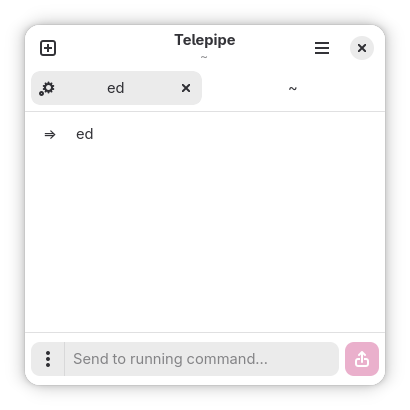
A new icon has been added at the top of the tab to show if a program is currently running within, in order to help differentiate inactive tabs from those with ongoing work.
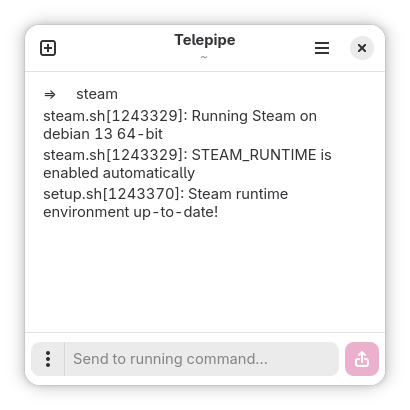
Normally, applications launched in a terminal will block further commands, behaving as with most other programs started from the terminal. This is rarely useful, most often just being frustrating.
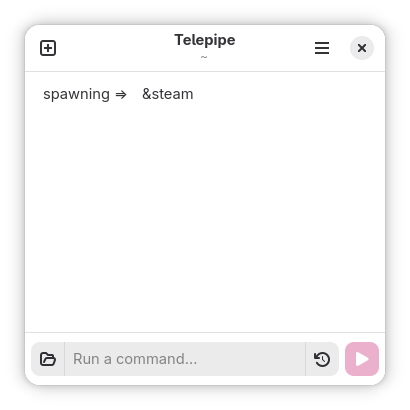
When a command is prepended with an ampersand (&) character, Telepipe will always quietly execute it in the background. This means that it won’t block the execution of other programs and the current tab (or even Telepipe itself) can be closed without disturbing the running program.
Telepipe’s implementation of this feature is guaranteed to prevent the spawned app from either taking input from, or sending output to, the Telepipe window.
If a program is started in the foreground, it is also possible to background it from the kebab menu to the left of the command entry. Any command sent to the background will also be prevented from further taking input or sending output to Telepipe, like when spawning a program for background execution.
Introducing Command Prefixes
Often, when doing command-line work with specific programs, it is necessary to run a command many times, often beginning the same way. With some programs such as Git or Secure Shell, this just means remembering to type “git” before every single thing you need to do. With more specialized programs like Kubernetes or Podman, this might mean including a dozen individual parameters denoting the context in which to perform a certain action.
In a terminal, traditionally one would press the “up” key to rewind history until finding a suitable existing command to modify, then modifying it to the new command to run. This way of engaging in repetitive work is often time-consuming and error prone.
Telepipe’s solution to this problem is a feature called prefixes.
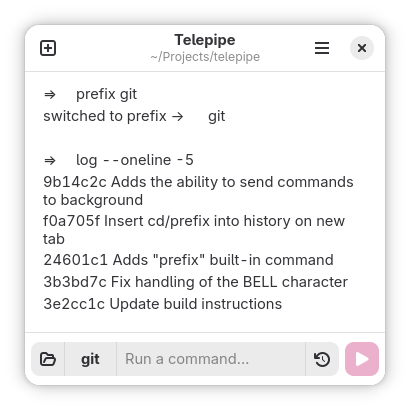
After a prefix is set, further commands issued by the user will be prefixed with the current prefix. Instead of using subshells, Telepipe executes commands within a prefix context as though the prefix was typed manually by the user. This means that Telepipe-specific features like clipboard redirection and quiet backgrounding remain available, which would not be possible when using subshells or interactive scripts to achieve this same effect.
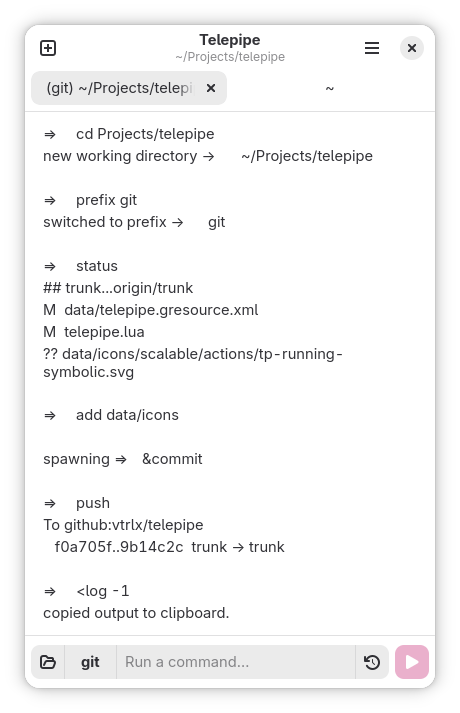
Notice that I issue a command named “&commit” in this example, which runs “git commit” quietly in the background. This could allow me to verify my work before finishing my commit message, without unnecessarily using multiple tabs or fumbling with extraneous output from my commit-writing app.
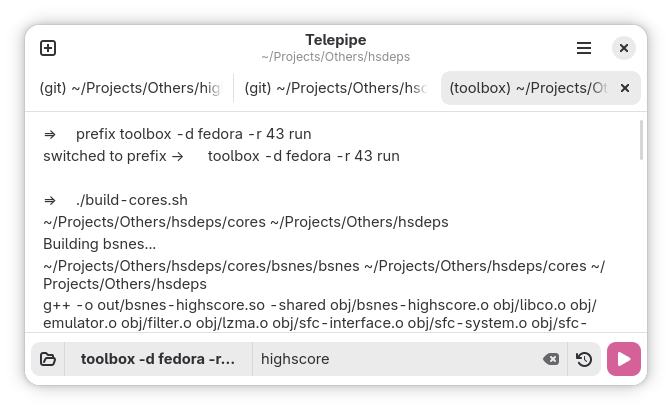
Prefixes allow specific classes of work to be delegated to their own tabs, allowing an approach where many tabs of a Telepipe window are delegated to executing tasks specifically for a certain command, such as using Git for handling version control of a project’s components while Toolbox is used to work within a sandbox.
Better still, it isn’t necessary to separate prefixes into their own tabs to get the benefit of keeping things orderly! Telepipe will automatically keep separate the histories of commands sent within (or without) different prefixes. When exiting a prefix, your command history won’t be polluted with everything that was done within the prefix. When re-entering a prefix, command history will be restored to what was previously done in that prefix within the current tab.
Telepipe’s ability to set command prefixes feels genuinely transformative, the kind of feature which is so versatile that I can only begin to fathom what people will do with it.
Having now daily driven Telepipe for nearly as long as I’ve been developing it, I can confidently say that it’s shaping up very nicely. Prefixes have already changed the way I use Git, and a friend tells me that she’ll enjoy having prefixes available for system administration both at work and for personal projects. Being able to start a graphical program without worrying about extraneous outputs polluting your shell is very nice to have, especially when you want to mix GUI tools with command-line work. It’s the kind of feature which only really makes sense to implement when rethinking the shell from the ground up with a graphical interface in mind, as opposed to half-pretending that it’s the 80s.
As always, Telepipe’s source lives on GitHub, including instructions for building it on Linux systems. Despite not being released, I would say that Telepipe is ready for daily use. If you regularly work in the command-line, consider trying it out. I’m happy to help fix issues with command-line programs that don’t work properly in Telepipe, or otherwise develop workarounds for common use-bases.