⇐ Blog
Telepipe
A long overdue revolution in the command-line is coming, but it needs your help.
January 16, 2026
Previously on this blog, I explained why the terminal falls short on delivering a good experience in using the command-line. In it, I stated that I think a better alternative is possible.
What I neglected to mention is that I’ve been building one such alternative, and it is shaping up quite nicely.
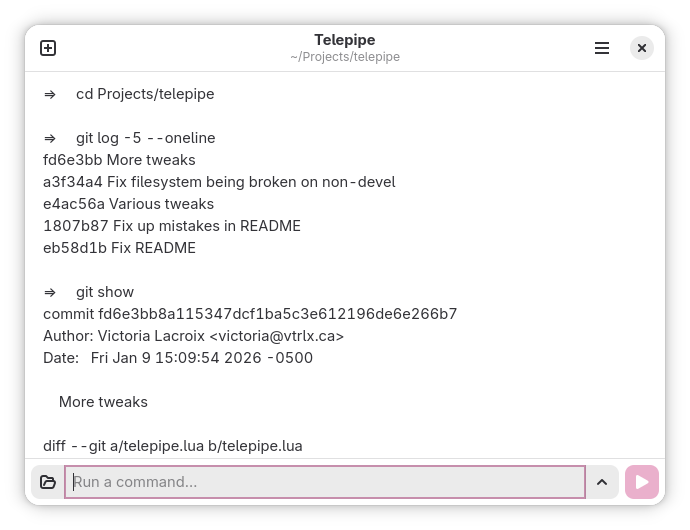
Telepipe allows you to run command-line programs with an ease not found anywhere else. The command entry is editable using the mouse, text can be highlighted and dragged-and-dropped to build new command-lines from existing output. Command output is editable like any other text editor, allowing you to write notes, selectively delete irrelevant portions of it, or make final adjustments on output before copying it for use elsewhere.
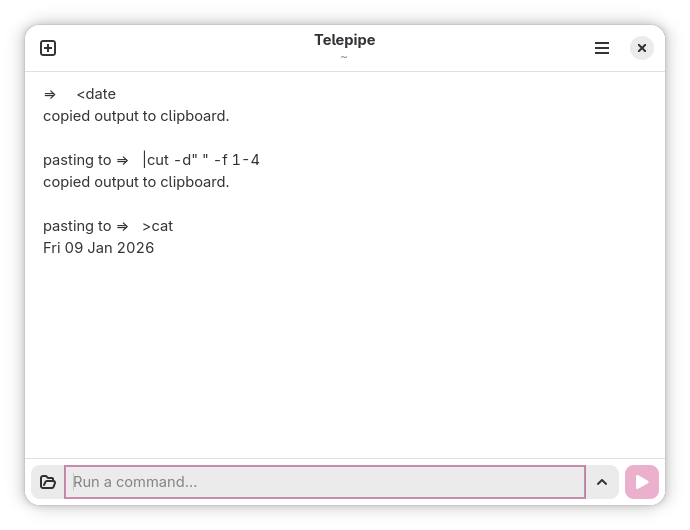
Telepipe also boasts first-class support for using the clipboard with commands. By prefixing a command with >, <, or |, Telepipe will paste the clipboard’s contents into the command as input, copy the command’s output to the clipboard, or do both. By combining clipboard redirection with classic, battle-tested tools like sed or awk, as well as any number of tools being developed today with command pipelines in mind, Telepipe facilitates advanced text processing for any software where it’s possible to copy and paste text.
Telepipe is primarily inspired by Bell Labs' old and abandoned Plan 9 operating system. With a focus on proportional type, support for passing arbitrary text into and out of command pipelines, and an emphasis on combining the command-line and graphical interfaces without any support for clunky terminals, it was decades ahead of its time while also being too different to survive in an ecosystem where UNIX had become entrenched. Telepipe aims to bring some of Plan 9’s boldest ideas to today’s users in a form that fits modern human interface principles while also delivering a command-line experience that will be intuitive both to beginners and experts alike.
I’ve been working on Telepipe for three weeks now. In that time, followers of my Mastodon account have received regular updates to its development as well as teasers of what is possible to do in Telepipe. Responses are consistently positive, with many curious to see the app released. One friend who has tried it believes Telepipe will transform the way she works. Another has lamented the demise of Plan 9 and hopes Telepipe will be a worthy a successor to at least some of its ideas. Many of my followers in the GNOME sphere seem particularly intrigued by it.
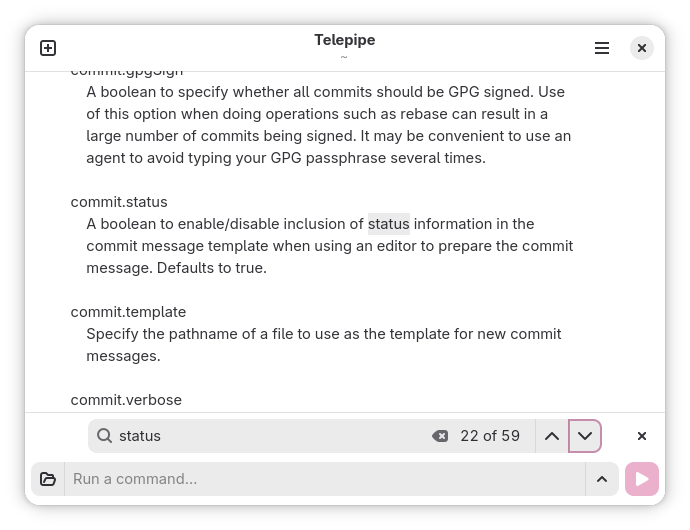
In its current state, I believe Telepipe is already capable of handling most command-line work. I myself have switched to using it for nearly all command-line work after just a single day of working on it, and it has only gotten better in the weeks since. If you are on Linux and are interested in trying Telepipe—especially if you already do a lot of command-line work—please try it out even though it’s not yet released.
Because Telepipe is pushing the boundaries of what is possible to do with a command-line interface, it is bound to have issues. Some of these problems will be solvable, but others will require workarounds. Part of what’s preventing Telepipe from being released is that I’d like at the very least to make sure that documentation on workarounds is comprehensive for most common workflows, particularly with an emphasis on solutions that should be readily available to GNOME users. By using it, discovering issues, and bringing my attention to them, I can improve Telepipe where possible, but by its nature it won’t be able to run anything that requires the terminal. Therefore, I also want to ensure Telepipe’s documentation lists ample workarounds for common incompatible software so new users can be well-equipped to make the leap from the terminal.
Instructions for compiling and installing Telepipe on your Linux machine can be found along with its source code and documentation on GitHub.
Together, we can get Telepipe to a state where a general audience can use and appreciate it with minimal troubleshooting work.
Thank you.